
1.4 KiB
1.4 KiB
Welcome to Teams Toolkit!
Quick Start
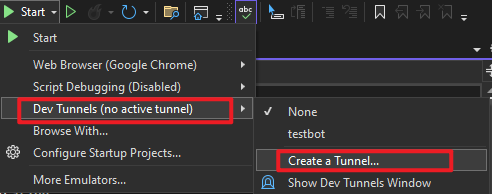
- In the debug dropdown menu, select Dev Tunnels > Create A Tunnel (set authentication type to Public) or select an existing public dev tunnel
- Right-click the 'TeamsApp' project in Solution Explorer and select Teams Toolkit > Prepare Teams App Dependencies
- If prompted, sign in to Visual Studio with a Microsoft 365 work or school account
- Press F5, or select Debug > Start Debugging menu in Visual Studio to start your app

- In the opened web browser, select Add button to test the app in Teams
- In the message input field, type and send anything to your bot to get a response
Run the app on other platforms
The Teams app can run in other platforms like Outlook and Microsoft 365 app. See https://aka.ms/vs-ttk-debug-multi-profiles for more details.
Get more info
New to Teams app development or Teams Toolkit? Explore Teams app manifests, cloud deployment, and much more in the https://aka.ms/teams-toolkit-vs-docs.
Report an issue
Select Visual Studio > Help > Send Feedback > Report a Problem. Or, create an issue directly in our GitHub repository: https://github.com/OfficeDev/TeamsFx/issues